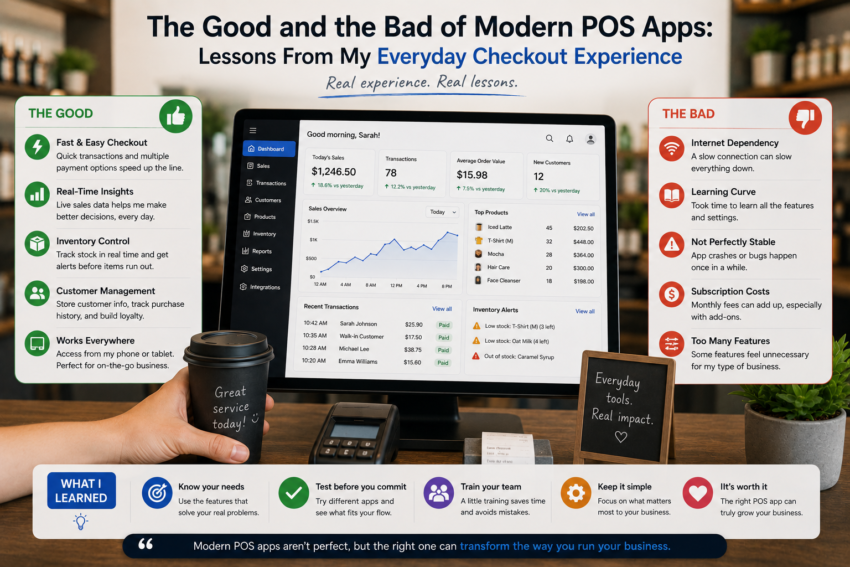
When I first started using a modern point-of-sale application, I expected it to make checkout faster and more organized. I had seen how POS software could manage products, record transactions, track inventory, and generate reports, so I assumed the transition would be straightforward.
After using a POS app regularly, I discovered that the reality was more balanced.
There were features that genuinely improved my daily workflow, but there were also moments when the technology created new challenges. The experience taught me that modern POS software is neither a perfect solution nor simply a digital cash register. Its value depends on how well it fits the business and how carefully it is used.
The Good: Faster Checkout
The first obvious advantage was speed.
Once the system was properly configured, I could search for products, add items to a transaction, calculate totals, and process payments without doing everything manually.
This became particularly helpful during busy periods.
A few seconds saved on one transaction might not seem significant, but repeated throughout the day, those small improvements can add up.
The most useful technology was often the technology I barely noticed because it simply made the process smoother.
The Good: Better Transaction Records
Another major advantage was having digital transaction records.
With a traditional cash register, reviewing an old transaction can be difficult depending on how the system stores information.
A modern POS application can make transaction history easier to search and review.
This became useful when I needed to answer questions about previous purchases.
Instead of relying entirely on memory or paper receipts, I could refer to the recorded information.
That added a level of organization I had not fully appreciated before.
The Good: Inventory Visibility
Inventory management was probably my favorite feature.
When sales and inventory are connected, every transaction can contribute to a clearer picture of available stock.
This helped me understand which products were selling quickly and which ones were not moving as expected.
It also made purchasing decisions more informed.
Rather than relying only on intuition, I could look at sales and inventory information before deciding what needed attention.
The Good: Useful Sales Reports
Modern POS applications can also transform sales transactions into reports.
Instead of seeing only a total amount at the end of the day, I could review different aspects of sales activity.
I found it useful to look at product performance and general sales patterns.
The important lesson was not to become overwhelmed by data.
A report is valuable when it helps answer a specific business question.
The Good: Flexible Payment Options
Depending on the POS application and payment provider, modern systems can support multiple payment methods.
This can make checkout more convenient for customers.
It also gives businesses more flexibility as payment preferences change.
However, payment availability and fees can vary by region and provider, so businesses need to understand their specific setup rather than assuming every option is available everywhere.
The Bad: Too Many Features
One of the biggest disadvantages I encountered was complexity.
Modern POS apps can contain a huge number of features.
At first, that sounds like an advantage.
In practice, too many settings can make the software difficult to learn.
I initially tried to understand everything at once.
That only created frustration.
Eventually, I focused on the functions I actually needed.
The experience taught me that a long feature list does not necessarily mean better software.
The Bad: Technical Problems
Technology can also fail.
Internet connectivity issues, device problems, software errors, or payment interruptions can interfere with checkout.
These situations are particularly frustrating when customers are waiting.
A traditional cash register may not provide as much information, but its simplicity can sometimes be an advantage.
Using modern POS software made me realize how important it is to have a backup procedure for technical problems.
The Bad: Training Takes Time
Switching to a new POS system also requires training.
Employees need to understand how to process sales, handle corrections, manage payments, and follow the appropriate procedures.
If the system is complicated, training can take longer.
I found that teaching basic functions first worked much better than explaining every feature immediately.
Once employees became comfortable with everyday tasks, advanced functions could be introduced gradually.
The Bad: Security and Privacy Responsibilities
Modern POS systems can store valuable information about transactions, products, employees, and sometimes customers.
This creates additional responsibilities.
Businesses need to think about passwords, user permissions, device security, software updates, and appropriate access to information.
Convenience should not come at the expense of responsible data management.
The Bad: Subscription and Additional Costs
Another consideration is cost.
Some POS platforms may use subscription pricing, while others may charge additional fees for certain services, hardware, integrations, or payment processing.
The initial price may not represent the entire cost of using the system.
I learned that businesses should evaluate the total cost over time and compare it with the actual value provided.