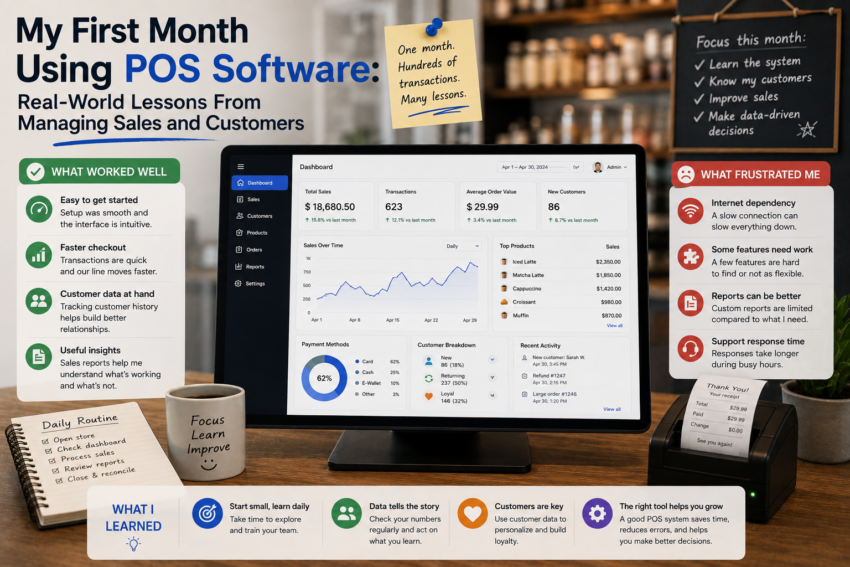
Before using point-of-sale software, I thought a POS system was mainly a digital version of a cash register. Its primary purpose seemed simple: record purchases, calculate totals, accept payments, and provide receipts.
After spending my first month using POS software for daily sales and customer interactions, I realized that modern POS systems can play a much larger role in everyday business operations.
The first month was not completely smooth. There were moments when I had to learn new procedures, adjust my habits, and rethink how I organized sales information. But those challenges also taught me several practical lessons that I would not have understood simply by reading a list of POS features.
The First Week Was About Getting Comfortable
The first few days were mostly about learning.
Even though the basic checkout process was relatively straightforward, the software contained many additional functions. There were product categories, inventory settings, transaction records, reports, user accounts, payment options, and other tools.
I quickly realized that trying to learn everything at once was unnecessary.
Instead, I focused on the functions I needed most frequently.
I practiced creating transactions, searching for products, processing payments, issuing receipts, and reviewing completed sales.
Once those actions became familiar, the rest of the system became much easier to understand.
Sales Became More Organized
One of the first improvements I noticed was organization.
With a traditional checkout process, information about individual transactions can be difficult to review later unless records are carefully maintained.
POS software automatically keeps transaction information in a structured format.
If I needed to check a previous sale, I could search through the transaction history rather than trying to remember what happened.
This became particularly useful when dealing with questions about purchases.
Instead of relying entirely on memory, I could look at the recorded information.
Customer Service Improved in Small Ways
I also noticed that POS software could influence the customer experience.
A well-configured system made checkout faster and reduced manual calculations.
Product information was easier to access, totals were calculated automatically, and receipts could be generated quickly.
These may seem like small improvements, but small delays become noticeable when customers are waiting during busy periods.
I learned that the best POS features are often the ones customers barely notice because they simply make the checkout process smoother.
Inventory Management Became Part of Daily Sales
Another major lesson was the connection between sales and inventory.
Previously, I thought of inventory management as something separate from checkout.
Using POS software changed that perspective.
When a product was sold, inventory information could be updated according to the system’s configuration.
This made it easier to see which products were moving quickly and which ones were not.
It also helped me think about stock management more proactively.
Instead of waiting until a shelf looked empty, I could use sales and inventory information to identify products that might need attention.
Reports Changed the Questions I Asked
The reporting features were another valuable part of the experience.
During my first week, I mostly looked at basic sales totals.
By the second and third weeks, I started asking more useful questions.
Which products were selling most frequently?
Were there particular days with stronger sales?
Which products seemed less popular?
Could sales patterns help with future purchasing decisions?
The software did not automatically answer every business question, but it made the necessary information easier to access.
That was an important distinction.
Data is valuable when it helps support better decisions.
Managing Customers Required More Thought
Customer management was an interesting part of my first month.
Depending on the POS system, customer information can be recorded alongside transactions.
This can help businesses understand purchasing history and provide more personalized service.
However, I also learned that customer data needs to be handled responsibly.
Businesses should only collect information that they genuinely need and should understand how that information is stored and protected.
Technology makes data collection easier, but responsible use is still essential.
Employee Accounts Improved Accountability
Another feature I found useful was individual user access.
Instead of having everyone share one account, employees could have their own credentials and permissions, depending on the POS system.
This created clearer accountability.
It also helped separate basic checkout activities from administrative functions.
I learned that permission management is important even for smaller operations because not every user needs access to every setting.
Not Everything Went Smoothly
My first month also included frustrations.
Sometimes I forgot where a particular setting was located.
At other times, a workflow that seemed obvious turned out to require additional configuration.
There were also moments when technology created problems instead of solving them.
A slow connection or unfamiliar interface can cause delays, especially when customers are waiting.
This taught me an important lesson: businesses should always have a basic backup procedure for technical problems.
Modern software is helpful, but no technology is completely immune to unexpected issues.
I Learned to Ignore Unnecessary Features
One of the biggest lessons from the month was that I did not need every available feature.
Modern POS systems can include loyalty programs, advanced analytics, marketing integrations, employee management, online ordering, and many other capabilities.
Some businesses may benefit greatly from these tools.
For my workflow, however, some features simply added complexity.
I learned to start with essential functions and add new capabilities only when there was a clear reason.
What Changed After 30 Days?
By the end of the first month, using the POS system felt much more natural.
I was faster at processing transactions, more comfortable reviewing sales, and better able to understand inventory information.
More importantly, I had changed the way I thought about sales.
A transaction was no longer just an exchange of money for a product.
It was also a piece of information that could help explain what was happening in the business.