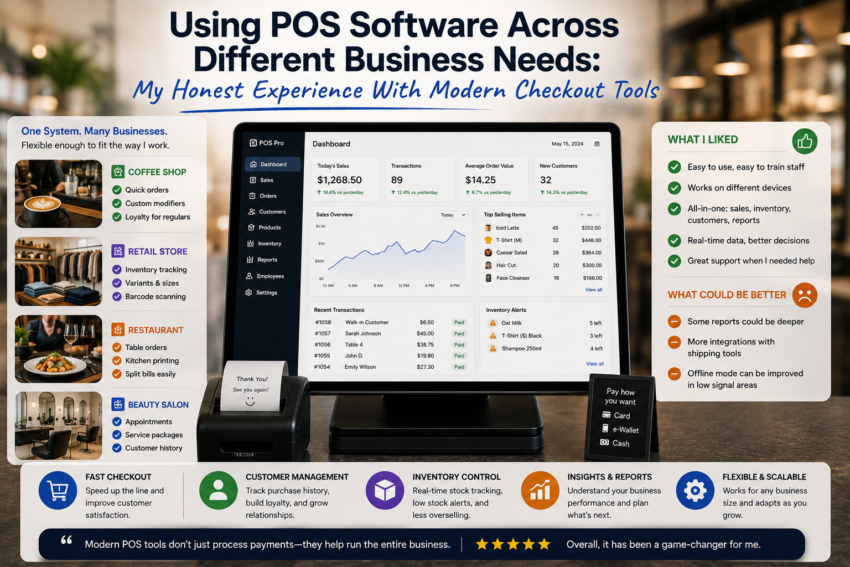
When I first encountered modern point-of-sale software, I assumed that POS systems were primarily designed for retail stores. I imagined a computer at a checkout counter, a product list, a payment screen, and a receipt printer.
After using different POS tools and considering how they work across various business situations, I realized that modern checkout software is much more flexible than I originally thought.
A POS system can support a small shop, a restaurant, a service business, a temporary sales booth, or a growing company. However, my experience also taught me that the best POS solution depends heavily on the specific needs of the business.
A POS System Is More Than a Cash Register
The biggest change in my understanding came from realizing that modern POS software connects several activities.
A transaction is not simply a payment.
It can also update inventory, create a sales record, contribute to reports, and provide information about customer activity.
This connection can save time because employees do not necessarily need to record the same information in multiple places.
However, this only works well when the system is configured correctly.
Retail Requires Speed and Inventory Control
For a retail environment, I found that speed was one of the most important considerations.
Customers generally want to complete purchases without unnecessary delays.
A good POS system can help employees search for products, calculate totals, apply discounts where appropriate, and process payments efficiently.
Inventory management is equally important.
When sales are connected to inventory information, it becomes easier to understand which products are selling and when stock may need to be replenished.
For retail businesses with many products, this can be more valuable than having an attractive checkout interface.
Restaurants Have Different Priorities
Restaurant operations introduced a different set of requirements.
The workflow is not simply about selling individual products. Orders may involve tables, modifiers, multiple items, special requests, kitchen preparation, and different payment arrangements.
This taught me that a POS system designed for retail may not necessarily be ideal for a restaurant.
The software needs to reflect how the business actually operates.
For example, organizing menu items and communicating orders efficiently can be more important than traditional inventory features.
This reinforced an important lesson: POS software should fit the workflow rather than forcing the workflow to fit the software.
Service Businesses Need Flexibility
Service-based businesses also have different requirements.
A service provider may not sell physical products at all.
Instead, the business may need to manage appointments, service packages, customer information, invoices, or deposits.
In this environment, the checkout function is only one part of the process.
The most useful software is therefore likely to be the one that connects payments with customer and service information.
Mobile Businesses Benefit From Portability
I also found mobile POS tools interesting for businesses that operate outside a permanent location.
Market vendors, event sellers, pop-up shops, and mobile service providers may not have a traditional checkout counter.
A smartphone or tablet-based POS system can provide more flexibility.
Sales can potentially be processed wherever customers are, provided the necessary device, payment solution, and connectivity are available.
This is one area where modern POS technology can significantly change the traditional idea of a checkout.
Customer Management Can Add Long-Term Value
Customer management was another feature that I initially underestimated.
A POS system can sometimes store customer information and transaction history, depending on its configuration.
This can help businesses understand purchasing patterns and provide more consistent service.
However, customer information should be handled responsibly.
Businesses should consider what information they actually need, who can access it, and how it is protected.
Collecting more data is not automatically better.
Reporting Helped Connect Daily Activity With Bigger Decisions
One of the most useful features across different business needs was reporting.
A busy day can make it difficult to step back and understand what is happening.
Reports provide an opportunity to review sales activity after the rush is over.
I found that simple questions were often the most useful.
Which products are performing well?
When are sales busiest?
Which services are most popular?
Are sales changing over time?
The value of reporting comes from turning transaction records into information that can support decisions.
Employee Management Matters as Businesses Grow
As the number of employees increases, user management becomes more important.
Individual accounts and permissions can help businesses control access to sensitive settings.
Employees may need to process sales, while managers may need access to reports or administrative functions.
Separating these responsibilities can improve organization and accountability.
I learned that employee management is not just an advanced feature for large companies. Even smaller businesses can benefit from sensible access controls.
Integrations Can Reduce Repetitive Work
Modern POS applications can also connect with other business software.
Accounting, inventory, ecommerce, customer management, and other platforms may be integrated depending on the POS provider.
The advantage is straightforward: information may not need to be entered repeatedly.
However, integrations can also add complexity.
I learned that businesses should only connect systems when the integration provides a meaningful benefit.
The Biggest Problem: Too Many Features
The biggest frustration I encountered with modern POS software was complexity.
Some systems offer an enormous number of features.
At first, this seems like an advantage.
Eventually, however, too many options can make training and daily use more difficult.
I prefer starting with the essential functions and adding advanced features only when they solve a genuine problem.