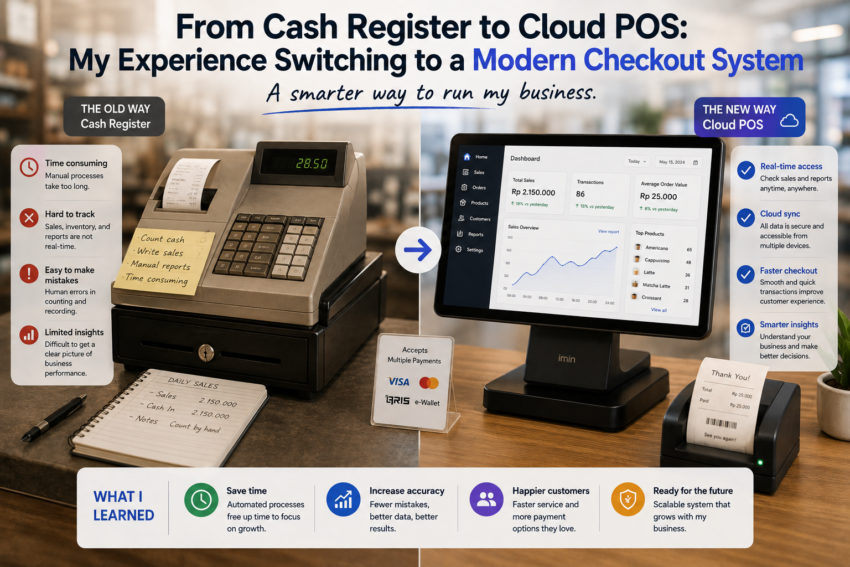
For years, I thought a cash register was all a small business really needed. It handled payments, displayed totals, and provided receipts when necessary. The process was familiar, straightforward, and easy to understand.
Then my daily sales started becoming more complicated.
There were more products to manage, more transactions to track, and more information I wanted to understand. I eventually decided to move from a traditional cash register to a cloud-based point-of-sale system.
The transition was not completely effortless, but it changed the way I thought about checkout technology and everyday business management.
Why I Decided to Make the Switch
The biggest reason for switching was organization.
A traditional cash register is excellent at one primary job: processing transactions. However, I wanted more information about what happened after each sale.
I wanted to know which products were selling, how sales changed over time, and how inventory was being affected.
Keeping track of all this manually became increasingly inconvenient.
A cloud POS seemed like a practical next step because it combined checkout functions with additional business-management capabilities.
The Setup Was Different From What I Expected
I initially assumed that moving to a cloud POS would require complicated technical knowledge.
Fortunately, the basic setup was relatively straightforward.
I needed to create products, configure prices, establish payment options, and organize user accounts.
The part that required the most attention was making sure the information was accurate before starting regular sales.
A mistake in a product price or inventory quantity could create problems later.
I learned that spending time preparing the system properly was worth it.
My First Day Using Cloud POS
The first day was a learning experience.
I knew how to use a traditional cash register almost automatically, so moving to a touchscreen interface felt different.
There were menus, product categories, search functions, payment options, and other features.
The first few transactions were slower than I expected.
But after practicing, the process became much more natural.
Within a short time, I was able to process sales without thinking too much about where different functions were located.
Inventory Became Much Easier to Understand
One of the biggest advantages I noticed was inventory management.
With the traditional system, inventory information often required separate tracking.
With the cloud POS, sales and inventory could be connected within the same system.
When an item was sold, the corresponding inventory information could be updated automatically, depending on the system configuration.
This gave me a much clearer picture of what was happening with products.
Instead of discovering that something was running low only after checking shelves, I could use the available inventory information to plan ahead.
Sales Reports Became Part of My Routine
Another major change was the availability of sales reports.
Previously, I focused mainly on how much money came through the register.
With the cloud POS, I could look at sales information from different perspectives.
I could see which products performed well, review transaction history, and identify patterns in daily activity.
I learned not to become obsessed with every number.
The most useful reports were the ones that helped answer practical business questions.
Cloud Access Added Flexibility
The word “cloud” initially seemed like a technical detail, but it became one of the most useful aspects of the new system.
Depending on the platform and configuration, business information could be accessed from supported devices without being physically next to the cash register.
This provided additional flexibility.
I could review information without interrupting the checkout process.
However, this convenience also reminded me that account security and reliable internet access are important considerations when using cloud-based business software.
Payment Options Became More Flexible
Modern POS systems can support various payment methods depending on the hardware, software, region, and payment provider.
This flexibility can make the checkout experience more convenient for customers.
However, I learned that payment configuration needs to be tested carefully.
A business should understand how transactions are processed, what fees may apply, and what happens if connectivity or payment services are temporarily unavailable.
Employee Management Was Another Improvement
The ability to create separate user accounts was useful.
Instead of everyone sharing the same access, employees could potentially have individual accounts with different permissions.
This provided greater accountability and helped protect administrative settings.
It also made me realize that software security is not something that should be considered only after a problem occurs.
The Biggest Frustration Was Dependence on Technology
The transition was not perfect.
A cloud-based system depends more heavily on technology than a traditional cash register.
Internet problems, device issues, software updates, or account problems can interrupt operations.
For this reason, I learned the importance of having a backup plan.
Even the most modern system needs a practical procedure for handling unexpected technical problems.
I Did Not Need Every Feature
One of the most important lessons was learning to ignore unnecessary features.
Modern POS platforms can offer loyalty programs, advanced analytics, integrations, employee management, marketing tools, and many other capabilities.
Some businesses may benefit from them.
I found it better to start with the functions I actually needed and add complexity only when there was a clear reason.
Final Thoughts
Switching from a traditional cash register to a cloud POS was more than a technology upgrade.
It changed the way I looked at daily sales.
The checkout process became connected to inventory, reporting, customer service, and business information.
The transition required patience, training, and careful setup, but the benefits became clearer with regular use.
The biggest lesson I learned is that modern POS software should not be chosen simply because it is newer.
It should be chosen because it solves real problems.
For me, moving from a cash register to cloud POS meant turning transactions into useful information. Instead of simply knowing that a sale had happened, I could better understand what was sold, how sales were performing, and what information could help improve future business decisions.