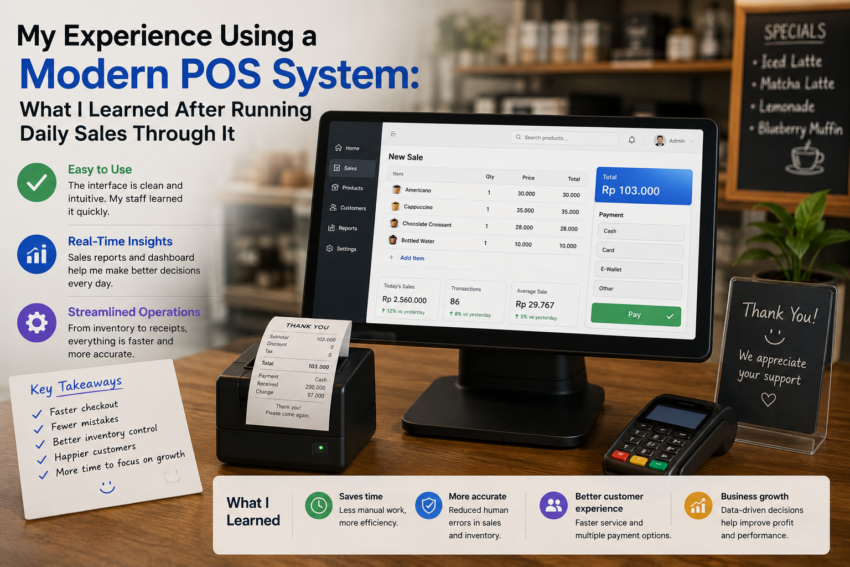
For a long time, I thought a cash register was simply a machine for accepting payments and printing receipts. As long as customers could pay and the transaction was recorded, I assumed there was not much more to consider.
That perspective changed when I started using a modern point-of-sale (POS) system for daily sales.
What initially looked like a digital replacement for a traditional cash register turned out to be much more than that. A modern POS system could help organize products, track transactions, monitor sales, manage inventory, and provide information that was difficult to obtain from a traditional checkout process.
After using one regularly, I learned several lessons that changed how I think about everyday business operations.
The First Challenge Was Learning the System
The first few days were not as easy as I expected.
A modern POS application usually has many more options than a traditional cash register. There were product menus, payment settings, employee accounts, reports, inventory tools, and other configuration options.
At first, this felt overwhelming.
I quickly realized that I did not need to learn every feature immediately.
I started with the basics: adding products, processing sales, accepting payments, printing receipts, and checking transaction history.
Once those functions became familiar, the additional features became easier to understand.
The experience taught me that good POS software does not need to be mastered in one day. Learning it gradually is often more effective.
Processing Sales Became More Organized
One of the first improvements I noticed was the checkout process.
Instead of manually calculating every item, the POS system automatically calculated totals and applied the appropriate information.
This reduced the amount of mental calculation required during busy periods.
The transaction history was also useful.
If I needed to review a previous sale, I could search for the transaction rather than relying on paper receipts or memory.
For a business handling many transactions, this organization can make everyday operations much easier.
Inventory Tracking Was More Valuable Than Expected
Before using POS software, inventory management could feel like a separate responsibility.
The POS system changed that relationship.
When products were sold, inventory information could be updated as part of the sales process, depending on how the system was configured.
This made it easier to understand which products were moving quickly and which ones were sitting on the shelf.
I discovered that inventory information is not just useful for counting products.
It can influence purchasing decisions.
If certain items consistently sell faster than others, that information can help determine when to reorder and how much stock may be needed.
Sales Reports Changed How I Looked at Business Activity
Another valuable feature was reporting.
A traditional cash register can record transactions, but turning those transactions into useful business information can require additional work.
Modern POS software can provide reports showing sales totals, transaction counts, popular products, and other performance information.
The biggest lesson I learned was that data is more useful when it helps answer specific questions.
Instead of looking at every available number, I started asking questions such as:
Which products sell most frequently?
When are sales busiest?
Are sales increasing or decreasing?
Which items may need more attention?
This made reports more practical.
Customer Service Became Faster
A good checkout experience is important for customers.
When the system was configured properly, processing a transaction became relatively quick.
Customers could see their purchase details clearly, choose an available payment method, and receive a receipt.
However, technology can also create problems.
If the POS system is slow, the internet connection fails, or an employee does not know how to use a particular feature, the checkout process can become frustrating.
This taught me that technology should support customer service rather than become an obstacle.
Mobile and Cloud Features Added Flexibility
One feature I appreciated was the flexibility offered by modern cloud-based POS systems.
Depending on the platform, business information can be accessible from different devices and locations.
This is particularly useful for business owners who do not want to be physically present at the checkout counter all the time.
However, cloud-based systems also make reliable internet access and account security more important.
A convenient system still needs responsible management.
Employee Access Requires Planning
Another lesson came from managing different users.
A POS system can provide separate accounts or permissions for employees, depending on the software.
This can make it easier to understand who performed certain actions and limit access to sensitive settings.
However, setting permissions requires thought.
Employees need enough access to perform their jobs efficiently, but not necessarily access to every administrative function.
Finding the right balance can improve both security and accountability.
Not Every Feature Was Necessary
Modern POS applications often advertise dozens of features.
Some are extremely useful, while others may not be relevant to a particular business.
I learned not to activate or configure everything simply because it was available.
The most useful setup was the one that matched actual business needs.
Adding unnecessary complexity can make training more difficult and increase the chances of mistakes.
Reliability Matters More Than Fancy Features
After using the system every day, I realized that reliability was more important than impressive features.
A simple POS system that consistently processes transactions is more valuable than an advanced platform that frequently causes problems.
Performance, backups, security, payment reliability, and technical support became important factors in evaluating the software.
These are not always the most exciting features to discuss, but they matter enormously during a busy sales period.
Final Thoughts
My experience using a modern POS system changed my understanding of what a digital cash register can do.
It was not simply a tool for accepting payments.
It became a central source of information about sales, products, inventory, transactions, and daily operations.
The biggest lesson I learned is that POS software works best when it is treated as a business tool rather than just a checkout application.
Start with the essential functions, learn the system gradually, use reports to understand what is happening, and avoid unnecessary complexity.
Technology cannot replace good business decisions, but the right POS system can provide better information and make everyday operations considerably more organized.
For me, that was the real value of moving from a traditional cash register to modern POS software: the checkout counter stopped being just a place where transactions happened and became a useful source of information for running the business.