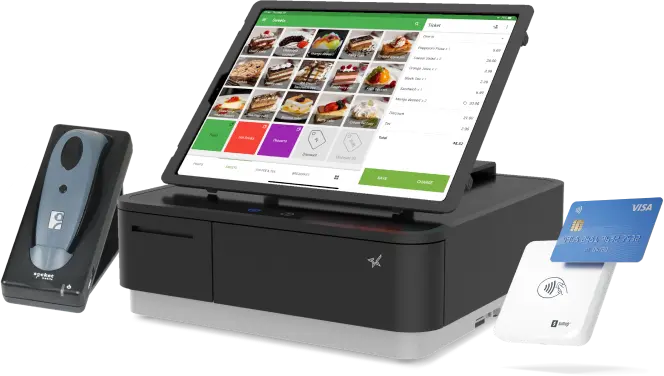
Introduction
Choosing a Point of Sale (POS) system is one of the most important decisions for small business owners. A reliable POS solution helps process sales, manage inventory, monitor employee performance, and generate valuable business reports. However, many startups and independent retailers have limited budgets, making expensive POS software difficult to justify.
This is where Loyverse POS has gained attention. Marketed as a free cloud-based POS system, Loyverse offers a wide range of features without requiring a large upfront investment. It has become a popular option among small retailers, cafés, restaurants, food trucks, salons, and service businesses around the world.
But can a free POS system truly meet the operational needs of growing businesses? In this review, we’ll explore Loyverse POS in detail, including its features, pricing structure, strengths, limitations, and whether it remains a smart choice for small retailers in 2026.
What Is Loyverse POS?
Loyverse POS is a cloud-based point-of-sale platform designed for small and medium-sized businesses. Unlike many enterprise POS systems, Loyverse focuses on simplicity, affordability, and ease of use.
The software enables businesses to process sales while providing tools for inventory management, customer loyalty, employee management, and reporting.
Loyverse is commonly used by:
- Convenience stores
- Clothing boutiques
- Coffee shops
- Restaurants
- Bakeries
- Food trucks
- Beauty salons
- Gift shops
- Small grocery stores
- Service businesses
One of its biggest attractions is that the core POS software is available at no cost, making it appealing to businesses just getting started.
Key Features of Loyverse POS
1. Easy-to-Use Point of Sale Interface
Loyverse is designed with simplicity in mind.
The checkout screen is clean, intuitive, and easy for employees to learn.
Staff can quickly:
- Process sales
- Search products
- Scan barcodes
- Apply discounts
- Accept various payment methods
- Print or email receipts
This user-friendly interface reduces training time and improves checkout efficiency.
2. Inventory Management
Despite being free, Loyverse includes useful inventory management tools.
Business owners can:
- Add products
- Organize categories
- Track inventory
- Receive stock alerts
- Manage product variants
- Monitor inventory changes
Accurate inventory tracking helps reduce stock shortages and improves purchasing decisions.
3. Customer Loyalty Program
One feature that distinguishes Loyverse is its built-in loyalty program.
Businesses can reward repeat customers by offering loyalty points based on purchases.
Benefits include:
- Increased customer retention
- Encouraging repeat visits
- Better customer engagement
- Improved shopping experience
Small retailers can build stronger customer relationships without purchasing separate loyalty software.
4. Sales Reporting
Loyverse provides useful reports that help owners understand business performance.
Reports include:
- Daily sales
- Weekly revenue
- Monthly performance
- Best-selling products
- Sales trends
- Payment summaries
These insights help business owners make informed decisions regarding inventory and pricing.
5. Employee Management
Businesses with multiple employees can monitor staff performance using optional employee management tools.
Managers can:
- Create staff accounts
- Assign permissions
- Track employee sales
- Monitor working hours
- Review cashier activity
These features improve accountability while simplifying workforce management.
6. Customer Database
Loyverse stores customer information that helps businesses personalize service.
Customer profiles may include:
- Purchase history
- Loyalty points
- Contact details
- Visit frequency
Understanding customer behavior allows businesses to improve marketing efforts and customer satisfaction.
7. Cloud-Based Access
Because Loyverse is cloud-based, business owners can access their data remotely.
Managers can review:
- Sales reports
- Inventory
- Customer information
- Business performance
Cloud synchronization also helps protect business data and simplifies management across devices.
Supported Payment Methods
Loyverse supports multiple payment options depending on the business setup.
Common payment methods include:
- Cash
- Credit cards
- Debit cards
- Mobile wallets
- Gift cards
- Other digital payment methods through compatible payment providers
This flexibility allows businesses to serve customers using their preferred payment methods.
Hardware Compatibility
Loyverse works with many commonly used POS devices.
Compatible hardware may include:
- Tablets
- Smartphones
- Barcode scanners
- Receipt printers
- Cash drawers
- Customer displays
Businesses can often use existing compatible equipment, reducing startup costs.
Pricing Overview
One of Loyverse’s greatest strengths is its pricing model.
Free POS Software
The core POS application is available without a monthly subscription for many standard features.
Optional Paid Add-Ons
Businesses that require additional functionality can purchase optional services such as:
- Advanced inventory management
- Employee management
- Enhanced analytics
This allows businesses to begin with minimal expenses and expand features as they grow.
Advantages of Loyverse POS
Free Entry Point
The free version makes Loyverse highly accessible for startups and small businesses.
Easy Setup
Businesses can begin selling quickly with minimal technical knowledge.
User-Friendly Interface
Employees can learn the system rapidly.
Built-In Loyalty Program
Customer rewards are included without needing separate software.
Cloud-Based Platform
Owners can manage operations remotely.
Flexible Hardware
Works with many affordable POS devices.
Potential Limitations
Although Loyverse offers impressive value, it does have some limitations.
Limited Advanced Features
Large retailers may require more advanced inventory and reporting capabilities than the free version provides.
Paid Add-Ons
Some useful business management features require optional subscriptions.
Less Enterprise Customization
Businesses with highly specialized workflows may prefer enterprise-level POS systems.
eCommerce Integration
While Loyverse supports various integrations, businesses that rely heavily on online retail may find more comprehensive omnichannel features in platforms designed specifically for eCommerce.
Which Businesses Benefit Most from Loyverse POS?
Loyverse is particularly well suited for:
Small Retail Stores
Independent retailers benefit from affordable inventory management and reporting.
Cafés
Quick checkout and loyalty programs improve customer service.
Food Trucks
Mobile hardware allows flexible payment processing.
Beauty Salons
Customer profiles support personalized service.
Convenience Stores
Inventory tracking simplifies daily operations.
Loyverse POS vs. Other Popular POS Systems
| POS System | Best For | Key Strength |
|---|---|---|
| Loyverse POS | Startups and small retailers | Free POS software with loyalty program |
| Square POS | Small businesses | Easy setup and broad ecosystem |
| Shopify POS | Omnichannel retailers | Online and offline integration |
| Clover POS | Small businesses | Flexible hardware and app marketplace |
| Lightspeed POS | Growing retailers | Advanced inventory management |
Each system serves different business needs, so business owners should compare features based on their operational requirements.
Security Features
Protecting customer and business information is essential.
Loyverse includes features designed to support secure business operations, including cloud-based data storage and user account controls.
Business owners should also:
- Use strong passwords
- Restrict employee permissions
- Keep devices updated
- Back up important business information
Maintaining good security practices helps reduce operational risks.
Customer Support
Loyverse provides several support resources, including:
- Online help center
- User guides
- Community resources
- Email support
- Knowledge base
Businesses can also access tutorials that explain system setup and common features.
Pros and Cons
Pros
- Free core POS software
- Easy to use
- Fast setup
- Built-in loyalty program
- Inventory management
- Cloud-based access
- Affordable hardware compatibility
- Optional paid upgrades for growing businesses
Cons
- Advanced features require paid add-ons
- Limited enterprise-level customization
- Not as feature-rich as some premium retail POS systems
- Omnichannel capabilities are less extensive than dedicated eCommerce platforms
Is Loyverse POS Worth It in 2026?
For startups, independent retailers, cafés, and other small businesses, Loyverse POS remains one of the best free POS systems available in 2026.
Its combination of inventory management, customer loyalty, reporting, and cloud accessibility provides excellent value, especially for businesses operating on limited budgets. While larger retailers with complex operations may eventually require more advanced software, Loyverse offers an ideal starting point for many entrepreneurs.
The ability to begin with free software and upgrade only when necessary makes the platform particularly attractive for growing businesses.
Final Verdict
Loyverse POS proves that a free point-of-sale system can still deliver meaningful business value. With its intuitive interface, inventory management tools, customer loyalty features, cloud-based reporting, and flexible hardware compatibility, it provides a practical solution for small retailers and service businesses worldwide.
Although it may not include every advanced feature found in enterprise-level POS platforms, Loyverse successfully balances affordability and functionality. For entrepreneurs looking to modernize their operations without making a significant financial investment, Loyverse POS remains one of the strongest entry-level POS solutions to consider in 2026.