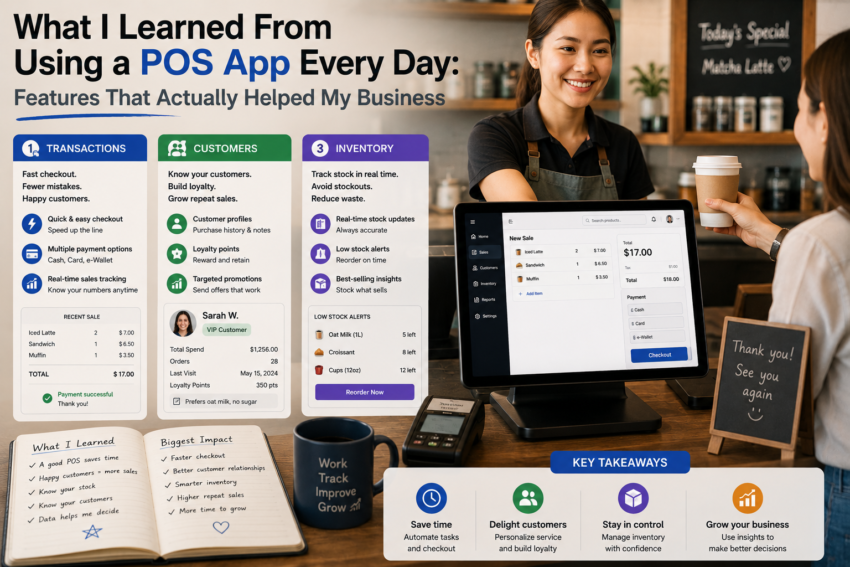
When I first started using a point-of-sale (POS) application, I expected it to make checkout easier. That was my main goal. I wanted to process transactions, calculate totals, and provide customers with receipts without relying on a traditional cash register.
After using a POS app every day, however, I discovered that the checkout process was only a small part of its value.
A modern POS application can connect sales, inventory, customer information, reporting, and other business activities in one place. Not every feature was equally useful, though. Some became essential parts of my routine, while others remained almost untouched.
Here are the features that genuinely helped my everyday business workflow.
1. Quick Product Search Saved Time
One of the simplest features turned out to be one of the most useful.
Being able to search for a product quickly made the checkout process smoother.
Instead of scrolling through long lists or manually entering product information, I could search by name or use organized categories.
This became especially valuable when there were many products in the catalog.
A few seconds saved on each transaction may not seem significant, but those seconds add up during a busy day.
2. Automatic Calculations Reduced Mistakes
Another feature I quickly appreciated was automatic calculation.
The POS app could calculate totals based on the products and quantities entered.
This reduced the amount of manual arithmetic required during checkout.
It also helped create more consistent transactions.
Of course, I still needed to check that product prices and configurations were correct. Software can calculate accurately, but only if the information inside the system is accurate.
That taught me an important lesson: good POS results depend on good setup.
3. Inventory Tracking Became Part of My Routine
Inventory management was probably the feature that had the biggest impact beyond checkout.
Before using a POS app, inventory could feel like a separate activity.
With the POS system, sales and inventory could be connected.
When products were sold, stock information could be updated based on the system’s configuration.
This gave me a clearer picture of what was available and which products were moving quickly.
I found this particularly useful when planning purchases.
Instead of relying entirely on memory, I could use sales information to make more informed decisions about stock.
4. Sales Reports Helped Me Understand Patterns
The reporting tools were another valuable addition.
At first, I only looked at daily sales totals.
Eventually, I became more interested in patterns.
Which products were popular?
When were sales busiest?
Were certain items consistently underperforming?
Having transaction information organized made these questions easier to investigate.
I learned that reports should not simply be viewed as collections of numbers. Their real value comes from helping business owners make better decisions.
5. Transaction History Helped With Customer Questions
Sometimes customers need clarification about a previous purchase.
A searchable transaction history made these situations easier to handle.
Instead of depending entirely on memory or paper receipts, I could look for the relevant transaction in the system.
This improved confidence when answering questions about previous purchases.
It also demonstrated how good recordkeeping can improve customer service.
6. Multiple Payment Options Improved Convenience
Modern POS applications can support different payment methods depending on the software, hardware, and payment providers available in a particular market.
Having several options can make checkout more convenient.
However, I learned that businesses should understand how each payment method works, including applicable fees, settlement times, and what happens when connectivity problems occur.
Convenience is useful, but reliability is just as important.
7. Employee Accounts Added Accountability
Individual user accounts were another feature I found useful.
Depending on the POS system, employees can be given different levels of access.
This means someone working at the checkout counter does not necessarily need access to administrative settings.
Individual accounts can also make it easier to understand who performed certain actions.
This added an additional layer of organization to daily operations.
8. Cloud Access Offered Flexibility
Cloud-based POS functionality was another feature I came to appreciate.
Being able to access relevant business information from supported devices can be convenient, particularly when the owner is not always standing at the checkout counter.
However, this flexibility also creates responsibilities.
Strong account security, appropriate permissions, reliable connectivity, and sensible backup procedures remain important.
Cloud technology can make information more accessible, but accessibility should be balanced with security.
9. Integrations Reduced Duplicate Work
Integrations were another feature that became useful over time.
A business may use separate applications for accounting, inventory, customer management, online sales, or other activities.
When systems can exchange information, employees may not need to enter the same information repeatedly.
This can save time and reduce manual errors.
I found that the best integrations were the ones that quietly improved the workflow without requiring constant attention.
10. Simple Customization Was More Valuable Than Advanced Features
Modern POS applications can offer extensive customization.
However, I learned that I did not need to configure everything.
Simple adjustments to product categories, receipts, permissions, and frequently used functions were more useful than complicated custom workflows.
The lesson was clear: customization should make the system easier to use, not turn the software into another project to manage.
What I Did Not Use Very Often
Interestingly, some of the most heavily advertised features were the ones I rarely used.
Advanced analytics, complex automation, extensive marketing functions, and elaborate customization options were not always relevant to my everyday work.
This changed how I evaluate software.
I no longer assume that a longer feature list means better software.
The best feature is the one that solves a real problem.