Introduction
For small business owners, selecting the right Point of Sale (POS) system is about more than accepting payments. A modern POS platform should simplify daily operations, improve customer service, help manage inventory, provide insightful reports, and support business growth. Whether you operate a retail store, café, restaurant, salon, or service business, the right technology can make managing your business much more efficient.
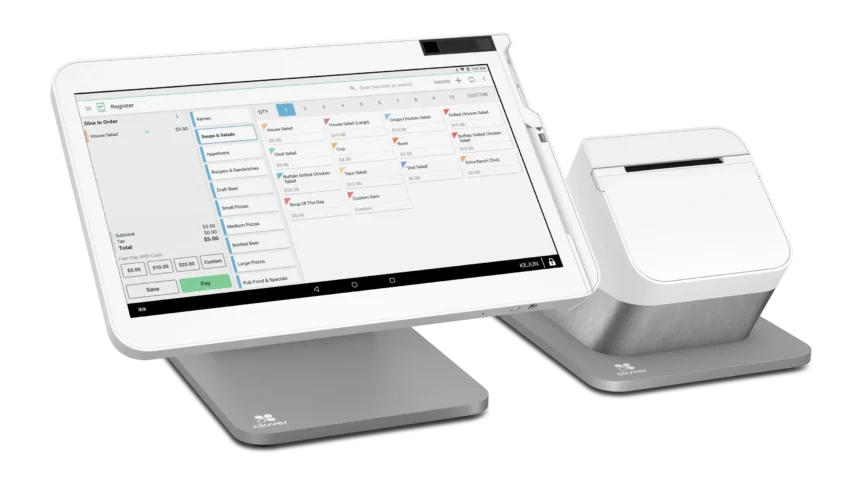
One of the most recognized names in the POS industry is Clover POS. Known for its sleek hardware, flexible software, and extensive app marketplace, Clover has become a popular choice for businesses seeking an all-in-one payment and business management solution.
But is Clover POS still worth considering in 2026? In this review, we’ll explore its key features, pricing considerations, advantages, disadvantages, and the types of businesses that can benefit the most from the platform.
What Is Clover POS?
Clover POS is a cloud-based point-of-sale system designed to help businesses manage payments, inventory, employees, customers, and sales reporting from one centralized platform.
Unlike traditional cash registers, Clover combines modern hardware with cloud software, allowing business owners to monitor operations from almost anywhere. The platform is suitable for a wide range of industries and offers several hardware options to match different business environments.
Clover is commonly used by:
- Retail stores
- Restaurants
- Coffee shops
- Bakeries
- Food trucks
- Beauty salons
- Barbershops
- Medical clinics
- Professional service providers
- Small hospitality businesses
Its flexibility makes it appealing to both new entrepreneurs and established small businesses.
Key Features of Clover POS
1. Easy Payment Processing
Clover supports a wide range of payment methods, making it easy for customers to pay using their preferred option.
Supported payment types generally include:
- Credit cards
- Debit cards
- Contactless payments
- Mobile wallets
- Gift cards
- Digital payment methods
Fast and reliable payment processing helps improve the checkout experience while reducing wait times.
2. Inventory Management
Managing inventory becomes easier with Clover’s built-in tools.
Business owners can:
- Add products quickly
- Track inventory levels
- Monitor stock movement
- Create product categories
- Receive low-stock notifications
- Manage product variations
For retail businesses, accurate inventory tracking helps prevent stock shortages and improves purchasing decisions.
3. Sales Reporting and Business Insights
Understanding business performance is essential for long-term success.
Clover provides detailed reports covering:
- Daily sales
- Weekly revenue
- Monthly performance
- Product sales
- Payment methods
- Employee sales
- Sales trends
These reports help business owners identify opportunities to improve profitability and operational efficiency.
4. Employee Management
Businesses with multiple employees can use Clover to manage staff access and performance.
Employee features include:
- Individual staff accounts
- Permission controls
- Sales tracking
- Time clock functionality
- Performance monitoring
These tools improve accountability while simplifying workforce management.
5. Customer Management
Clover helps businesses build stronger customer relationships by maintaining customer information in one place.
Owners can track:
- Purchase history
- Customer contact information
- Visit frequency
- Loyalty participation
Understanding customer behavior allows businesses to create more personalized experiences and marketing campaigns.
6. App Marketplace
One of Clover’s biggest advantages is its extensive App Market.
Businesses can expand functionality with applications for:
- Accounting
- Employee scheduling
- Marketing
- Loyalty programs
- Appointment booking
- Inventory management
- Delivery services
- Customer communication
This flexibility allows businesses to customize the system based on their specific needs.
7. Cloud-Based Management
Because Clover stores information in the cloud, business owners can access important data remotely.
Managers can review:
- Sales performance
- Inventory
- Reports
- Employee activity
- Customer information
Remote access provides greater flexibility, especially for owners managing multiple locations.
Clover Hardware Options
Clover offers several hardware configurations designed for different business sizes and industries.
Popular hardware options include:
- Clover Flex
- Clover Mini
- Clover Station
- Clover Go
- Customer-facing displays
- Receipt printers
- Cash drawers
- Barcode scanners
Businesses can choose the hardware that best fits their daily operations and available space.
Pricing Overview
Clover’s pricing structure varies depending on several factors.
Business owners should consider:
- Hardware purchases
- Monthly software subscriptions
- Payment processing fees
- Optional applications
- Additional services
Because pricing may differ depending on the payment provider and business requirements, reviewing current plans before purchasing is recommended.
Advantages of Clover POS
Flexible Hardware Choices
Businesses can select hardware that matches their size and operational needs.
Easy-to-Use Interface
The system is designed to be intuitive, reducing employee training time.
Large App Ecosystem
Businesses can customize the platform through third-party applications.
Cloud Accessibility
Owners can monitor operations remotely from internet-connected devices.
Strong Reporting Features
Comprehensive reports support informed business decisions.
Suitable for Multiple Industries
Clover works well across retail, restaurants, and service businesses.
Potential Limitations
While Clover offers many benefits, there are also a few considerations.
Subscription Costs
Advanced features and additional apps may increase monthly operating expenses.
Payment Processing Options
Businesses should carefully compare available payment processing arrangements and fees before committing to a provider.
Hardware Investment
Purchasing professional POS hardware requires an upfront investment.
Feature Availability
Some advanced capabilities may depend on the selected software plan or installed apps.
Which Businesses Benefit Most from Clover POS?
Clover is especially well suited for:
Retail Stores
Inventory management and sales reporting help streamline operations.
Restaurants
Quick payment processing and restaurant-focused apps support food service businesses.
Coffee Shops
Fast checkout improves customer flow during busy hours.
Salons and Spas
Appointment management applications enhance scheduling efficiency.
Service Businesses
Professionals can accept payments both in-store and on-site using mobile hardware.
Clover POS vs. Other Popular POS Systems
| POS System | Best For | Key Strength |
|---|---|---|
| Clover POS | Small businesses | Flexible hardware and app marketplace |
| Square POS | Startups and small retailers | Simple setup and affordable entry |
| Shopify POS | Omnichannel retailers | Strong online and offline integration |
| Lightspeed POS | Growing retailers | Advanced inventory management |
| Toast POS | Restaurants | Restaurant-specific workflows |
Choosing the right platform depends on your business model, operational needs, and future growth plans.
Security Features
Handling customer payment information securely is essential.
Clover includes security features designed to support safe payment processing and help protect sensitive business data.
Business owners should also adopt best practices such as:
- Creating strong passwords
- Restricting employee access
- Keeping devices updated
- Monitoring account activity regularly
Maintaining good security habits helps reduce operational risks.
Customer Support
Clover provides multiple support resources, including:
- Online help documentation
- Knowledge base
- Community resources
- Email support
- Phone support
- Live assistance (availability may vary)
Support options may differ depending on the merchant’s service provider and subscription plan.
Pros and Cons
Pros
- Modern and attractive hardware options
- User-friendly interface
- Excellent app marketplace
- Cloud-based management
- Flexible payment acceptance
- Strong reporting and analytics
- Suitable for many industries
- Scalable for growing businesses
Cons
- Initial hardware investment can be significant
- Monthly subscription costs vary by plan
- Payment processing terms may differ depending on provider
- Some advanced features require additional apps or subscriptions
Is Clover POS Worth It in 2026?
For many small business owners, Clover POS continues to be a competitive and reliable solution in 2026.
Its combination of flexible hardware, cloud-based software, customizable applications, and comprehensive business management tools makes it suitable for a wide range of industries. Businesses looking for a scalable platform that can grow with their operations will likely appreciate Clover’s flexibility.
However, business owners should carefully evaluate the total cost of ownership, including hardware, subscriptions, payment processing, and optional applications, before making a final decision.
Final Verdict
Clover POS remains one of the most versatile point-of-sale systems available for small businesses. Its intuitive interface, flexible hardware lineup, comprehensive reporting, inventory management, and customizable app marketplace provide a well-rounded solution for retailers, restaurants, and service providers alike.
Although it may require a higher upfront investment than some entry-level POS platforms, the combination of modern technology and scalable features offers long-term value for businesses planning to expand. Whether you’re opening your first storefront or upgrading an existing operation, Clover POS is a capable and reliable platform that deserves serious consideration in 2026.