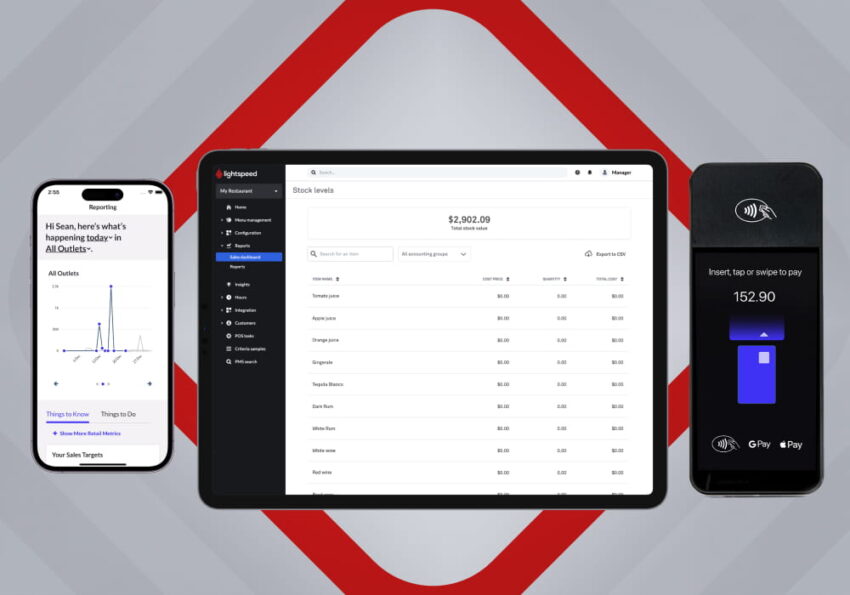
Introduction
Selecting the right Point of Sale (POS) system is a critical decision for any business looking to improve operations, increase efficiency, and deliver a better customer experience. Modern POS software has evolved far beyond simple payment processing, offering comprehensive tools for inventory management, sales reporting, employee administration, customer engagement, and multi-channel commerce.
Among the leading cloud-based POS platforms available today, Lightspeed POS has earned a strong reputation for serving retail stores, restaurants, golf courses, and hospitality businesses. Designed with scalability in mind, Lightspeed provides powerful management features that can support businesses from a single location to multi-store operations.
But is Lightspeed POS the right investment for your business in 2026? In this review, we’ll explore its features, pricing structure, strengths, limitations, and ideal use cases to help you make an informed decision.
What Is Lightspeed POS?
Lightspeed POS is a cloud-based point-of-sale platform developed for businesses that require more than basic payment processing. It combines sales management, inventory tracking, customer relationship management (CRM), reporting, employee management, and eCommerce integration into a single platform.
The software is widely used by:
- Retail stores
- Restaurants
- Cafés
- Bars
- Specialty retailers
- Bicycle shops
- Pet stores
- Jewelry stores
- Hospitality businesses
- Multi-location retailers
Because the platform is cloud-based, owners can access business information from almost anywhere using an internet-connected device.
Key Features of Lightspeed POS
1. Advanced Inventory Management
Inventory management is one of Lightspeed’s strongest features.
Unlike many entry-level POS systems, Lightspeed offers detailed inventory tools that help businesses monitor thousands of products across multiple locations.
Key capabilities include:
- Real-time inventory tracking
- Product variants (size, color, style)
- Low-stock alerts
- Purchase order management
- Supplier management
- Inventory transfers between stores
- Barcode support
For businesses with large inventories, these tools can significantly reduce manual work and improve stock accuracy.
2. Powerful Sales Reporting
Successful businesses rely on accurate data, and Lightspeed provides comprehensive reporting tools.
Business owners can generate reports covering:
- Daily sales
- Weekly performance
- Monthly revenue
- Profit margins
- Inventory movement
- Employee sales
- Product performance
- Customer spending trends
These reports help identify opportunities for growth and improve operational decision-making.
3. Multi-Location Business Management
One area where Lightspeed stands out is multi-store management.
Businesses operating several locations can manage everything from a centralized dashboard.
Owners can:
- Monitor inventory across stores
- Compare sales performance
- Transfer stock between locations
- Manage employees
- Review company-wide reports
This makes Lightspeed particularly attractive for expanding retail businesses.
4. Restaurant Management Features
Lightspeed also offers specialized tools for restaurants and food service businesses.
Restaurant-focused features include:
- Table management
- Menu customization
- Kitchen order management
- Course timing
- Split bills
- Mobile ordering
- Takeout management
- Delivery integration
These capabilities help restaurants improve workflow and customer service during busy hours.
5. Customer Relationship Management (CRM)
Building customer loyalty is essential for long-term success.
Lightspeed includes CRM features that allow businesses to:
- Store customer profiles
- Track purchase history
- Monitor spending behavior
- Create loyalty programs
- Offer personalized promotions
Having customer information available at checkout can improve the overall shopping experience.
6. eCommerce Integration
Many businesses today sell both online and in physical stores.
Lightspeed supports omnichannel retail by synchronizing:
- Products
- Inventory
- Orders
- Customer data
- Pricing
This reduces duplicate work and helps ensure inventory accuracy across sales channels.
7. Employee Management
Managing staff becomes easier with built-in employee tools.
Managers can:
- Create employee accounts
- Assign permission levels
- Track working hours
- Monitor sales performance
- Review transaction history
These features improve accountability while simplifying daily management.
Payment Processing
Lightspeed supports various payment methods, including:
- Credit cards
- Debit cards
- Contactless payments
- Mobile wallets
- Gift cards
Depending on the region, businesses may also have access to different payment processing providers, giving them flexibility to choose the option that best fits their needs.
Hardware Compatibility
Lightspeed works with professional POS hardware designed for retail and restaurant environments.
Compatible equipment may include:
- POS terminals
- Touchscreen registers
- Receipt printers
- Barcode scanners
- Cash drawers
- Customer-facing displays
- Kitchen printers
- Handheld ordering devices
Businesses can configure hardware based on their industry requirements.
Pricing Overview
Lightspeed offers subscription-based pricing with different plans designed for various business sizes and industries.
Pricing generally depends on factors such as:
- Business type
- Number of locations
- Required features
- Hardware selection
- Payment processing options
Businesses should compare available plans carefully to ensure they choose the package that aligns with their operational needs and budget.
Advantages of Lightspeed POS
Excellent Inventory Management
Lightspeed offers one of the most advanced inventory systems available for retailers.
Designed for Growing Businesses
The platform scales well as businesses expand into multiple locations.
Strong Reporting and Analytics
Detailed reports provide valuable insights into business performance.
Omnichannel Commerce
Inventory synchronization between online and physical stores simplifies operations.
Industry-Specific Solutions
Separate tools for retail and restaurant businesses improve usability.
Cloud-Based Accessibility
Owners can monitor business performance remotely.
Potential Limitations
Although Lightspeed is a powerful platform, there are a few considerations.
Learning Curve
Because of its extensive feature set, new users may need time to become familiar with the software.
Subscription Costs
Advanced business management tools come with recurring subscription fees that may be higher than entry-level POS systems.
Hardware Investment
Businesses upgrading from traditional cash registers may need to purchase compatible hardware.
Feature Complexity
Smaller businesses with very basic needs may not require all of Lightspeed’s advanced capabilities.
Which Businesses Benefit Most from Lightspeed POS?
Lightspeed is particularly well suited for businesses that require advanced operational management.
Retail Stores
Fashion boutiques, electronics retailers, sporting goods stores, pet shops, and specialty retailers benefit from inventory management and detailed reporting.
Restaurants
Restaurants can improve order accuracy, kitchen communication, and table service.
Multi-Location Businesses
Companies operating multiple stores can manage everything through one centralized system.
Hospitality Businesses
Hotels, cafés, and food service operations can streamline customer service and sales management.
Lightspeed POS vs. Other Popular POS Systems
| POS System | Best For | Key Strength |
|---|---|---|
| Lightspeed POS | Growing retail and restaurant businesses | Advanced inventory and multi-location management |
| Square POS | Small businesses | Easy setup and affordable entry point |
| Shopify POS | Omnichannel retailers | Strong online store integration |
| Toast POS | Restaurants | Restaurant-specific workflows |
| Clover POS | Small and medium businesses | Flexible hardware ecosystem |
Businesses should compare platforms based on operational complexity rather than simply choosing the lowest-cost option.
Security and Reliability
Security is essential for any POS system.
Lightspeed incorporates features designed to help protect business and customer data, including encrypted payment processing and cloud-based data management.
Business owners should also adopt best practices such as:
- Using strong passwords
- Limiting employee permissions
- Keeping software updated
- Reviewing user activity regularly
These practices contribute to a more secure business environment.
Customer Support
Lightspeed offers a range of customer support resources, including:
- Online help documentation
- Knowledge base articles
- Product tutorials
- Email support
- Live chat
- Phone support (availability may vary by plan and region)
Businesses can also access onboarding resources to help staff learn the platform more efficiently.
Pros and Cons
Pros
- Powerful inventory management
- Excellent reporting and analytics
- Multi-location support
- Strong restaurant features
- Cloud-based accessibility
- Omnichannel selling capabilities
- Employee and customer management tools
- Scalable for growing businesses
Cons
- Higher subscription costs than some entry-level POS systems
- Initial learning curve for advanced features
- Hardware purchases may increase startup costs
- Some small businesses may not need every available feature
Is Lightspeed POS Worth It in 2026?
For businesses experiencing growth or managing more complex operations, Lightspeed POS remains one of the strongest cloud-based solutions available in 2026.
Its advanced inventory management, detailed reporting, multi-location support, and industry-specific features provide excellent value for retailers and restaurants looking to improve efficiency. While the platform may represent a larger investment than basic POS systems, the productivity gains and operational insights can justify the cost for many businesses.
Final Verdict
Lightspeed POS is a comprehensive point-of-sale platform built for businesses that need more than simple payment processing. Its combination of inventory management, analytics, customer relationship tools, employee administration, and omnichannel capabilities makes it a powerful choice for growing retailers and restaurant operators.
Although it may not be the ideal fit for very small businesses with minimal operational requirements, Lightspeed excels in environments where organization, scalability, and data-driven decision-making are priorities.
If your business is expanding, managing multiple locations, or handling a large inventory, Lightspeed POS remains one of the most capable and future-ready POS solutions available in 2026.